
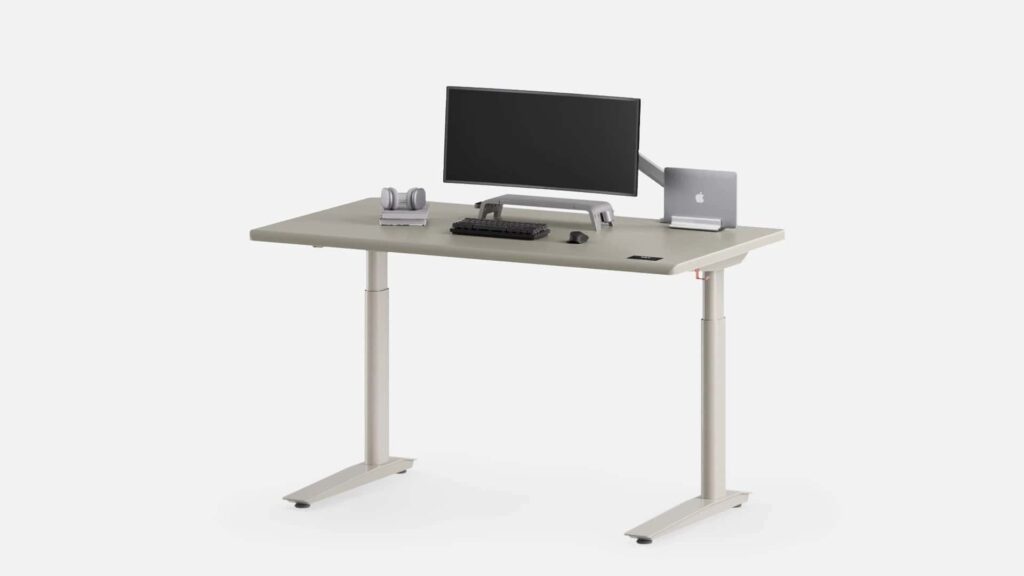
Standing desks have gone from startup flex to home office essential, and the Autonomous SmartDesk 5 Pro is gunning for that sweet spot between aesthetic minimalism and actual usability. It’s dual-motor, cable-managed, and built like it wants to be your productivity altar. But while it nails the fundamentals, it’s not without quirks—especially if you’re running a multi-monitor command center or need more than three power outlets.
Assembly: Easy on Paper, Brutal if You’re Stubborn
- Box weight: 57 lbs for the desktop, 85 lbs for the frame
- Suggested setup time: 15–30 minutes (with help)
- Actual solo setup time: ~45 minutes if you’re stubborn and winging it
The instructions are clear, the parts are well-labeled, and the only tool you’ll need is an Allen wrench. But balancing the frame solo is a circus act. If you’ve got a second set of hands, it’s smooth sailing. If not, expect a workout.
Desktop Surface: Smooth, Durable, and Mousepad-Optional (Sort Of)
- Material: HDF wood with powder-coated finish
- Size: 53 x 29 inches
- Edge: Rounded for forearm comfort
- Mousepad-free? Technically, yes, but it all depends on your setup, as many do!
The surface is slick enough to ditch your mousepad, but if you’re gaming or using a high-DPI mouse, you might miss the tactile feedback. It’s water-resistant, scratch-resistant, and minimalist-friendly—unless your aesthetic includes anime desk mats and RGB chaos (I mean, who wouldn’t have those?).
Cable Management: Finally, Someone Gets It
- Built-in tray: Drop-down compartment with metal dowels
- Extras: Zip ties, silicone clips, and a three-outlet power strip
- Functionality: Holds surge protectors, hides cable shame, and prevents accidental yanks during height changes
This is where the SmartDesk 5 Pro earns its “smart” title. The cable tray is large enough to house multiple devices, and the metal posts let you wrap cords like a pro. No need to buy add-ons or daisy-chain power strips—though with only three outlets, you’ll still need to plan your loadout carefully.
Height Control: Quiet, Customizable, and Roman Numeral Chic
- Preset slots: 3 programmable heights
- Control pad: Integrated, touch-sensitive, and flush with the desk
- Range:
- Two-stage frame: 30.7″–49.7″
- Three-stage frame: 27.2″–52.7″
- Noise level: ~30 dB (whisper quiet)
- Anti-collision: Adjustable sensitivity, but overly twitchy above level 1
Whether you’re sitting, standing, or walking on a treadmill, the presets make transitions seamless. The anti-collision feature is great for pet-proofing, but crank it too high and the desk will stop if you breathe near it.
Design: Rounded, Refined, and Frame-Savvy
- Legs: Oval-shaped for smoother movement and zero wobble
- Frame: C-shaped for better weight distribution
- Colorways: Stone Desert, Titanium White, Meteor Gray
- Build quality: Sturdy even at max height
The SmartDesk 5 Pro doesn’t just look premium—it feels it. The rounded edges and integrated controls give it a polished vibe, and the frame holds up under heavy setups. But…
Limitations: One Size, Three Outlets, and No Grommets
- Desktop size: Only available in 53 x 29 inches
- Power strip: 3 outlets (1 used by the desk itself)
- Customization: No grommets, no alternate widths
If you’re running a triple-monitor setup or need space for speakers, filing trays, and a second laptop, you’ll feel the squeeze. And while the built-in power strip is a win, it’s not enough for full-blown productivity rigs without some creative cable routing.
Final Verdict: Autonomous SmartDesk 5 Pro Is a Win—If You Know Its Limits
The Autonomous SmartDesk 5 Pro is a feature-packed, thoughtfully designed standing desk that nails the essentials: smooth height control, stellar cable management, and a surface that’s both durable and desk-mat-optional. But it’s not modular, and it’s not built for maximalists.
If you’ve got a clean setup, a mid-sized workspace, and a love for quiet motors and cable-free aesthetics, this desk delivers. Just measure twice—and maybe bring a friend for assembly.